
Repaste, Reboot, Reclaim: How Fresh Thermal Paste Brought My Workstation Back From Thermal Hell
My workstation sounded like a jet engine- until a 10-minute maintenance job changed everything. HWiNFO exposed the truth hiding beneath years of 24/7 use. One small tweak, massive difference. If your laptop runs hot and loud, this might be the most underrated fix.


There’s a moment every power user recognizes: the fans spin up, the chassis warms, and your laptop suddenly sounds like it’s preparing for vertical takeoff. You open a monitoring tool and the numbers stare back like a forensic report.
That’s exactly what happened on my Dell Precision 5540, a machine that had been running almost 24/7 for months at a time. Compiling, virtualizing, indexing, building, testing — rarely resting. Years later, the cooling system hadn’t failed.
The thermal paste had.
The hero of this story?
HWiNFO, created by Martin Malik, one of the most respected engineers in the hardware monitoring space — and, in my case, a former colleague from the Metalogix days. If you want to see everything happening inside your system — temperatures, throttling flags, power limits, VRM telemetry, memory power draw, and more — this is the tool.
Download it here:
👉 https://www.hwinfo.com/
No other utility gives you this level of visibility into what’s happening under the hood.
And what it revealed… was ugly.
🔥 The Before: Thermal Throttling in Plain Sight
Here’s what HWiNFO showed before repasting:
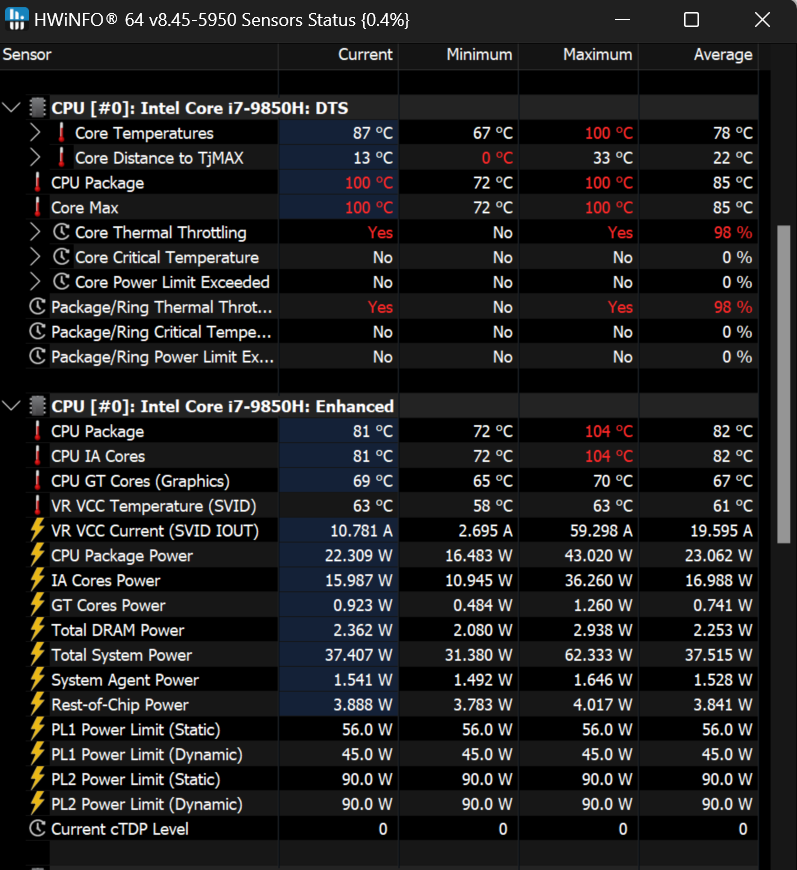
Let’s decode the important parts:
- CPU Package hitting 100°C
- Distance to TjMAX = 0°C
- Core Thermal Throttling = YES
- Package/Ring Thermal Throttling = YES
- Boost clocks collapsing
- Fans at maximum
This is textbook thermal paste degradation.
The i7-9850H is designed to boost aggressively, but thermal throttling forces it to pull back. Instead of sustaining high clocks, the CPU constantly slams into the thermal ceiling and retreats.
You’re not just running hot.
You’re losing performance.
🧠 What Thermal Paste Actually Does
Thermal paste doesn’t cool anything.
It removes air gaps between:
CPU die → heat spreader → heatsink
Air is a terrible conductor:
Air: ~0.026 W/mK
Thermal paste: ~5–12 W/mK
Copper: ~400 W/mK
Paste fills microscopic imperfections so heat can transfer efficiently into the heatsink.
Over time, however, paste degrades.
🧪 Why Thermal Paste Fails (Especially in Laptops)
Three main mechanisms:
1. Dry-out
Carrier fluid evaporates. Paste becomes chalky.
2. Pump-out effect
Thermal expansion cycles push paste away from the die center.
3. Particle separation
Fillers settle, leaving uneven thermal conductivity.
Laptop CPUs suffer more because:
- High thermal density
- Thin dies
- Uneven mounting pressure
- Constant thermal cycling
- Long runtime
Running 24/7 for months accelerates all of this dramatically.
❄️ The Repaste
Old paste removed.
Heatsink cleaned.
Fresh Thermal Grizzly Hydronaut applied.
Hydronaut was a deliberate choice:
- High viscosity
- Excellent pump-out resistance
- Long-term stability
- Designed for sustained workloads
- Ideal for workstation laptops
This isn’t benchmark paste.
This is long-haul reliability paste.
🚀 The After: Thermal Headroom Restored
After repasting:
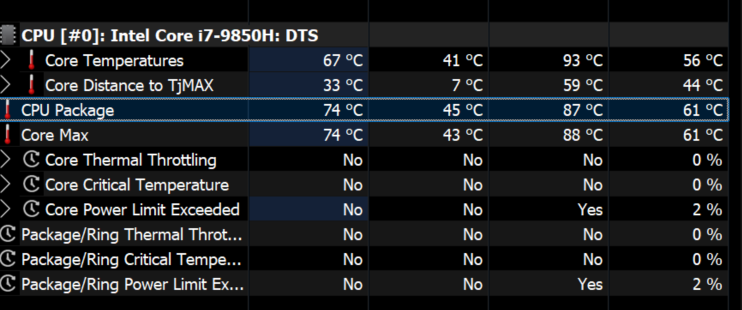
The difference is immediately visible:
- Temperatures significantly lower
- No thermal throttling
- CPU boosting above 4GHz more often
- Fans no longer screaming
- Sustained performance restored
Same hardware.
Same cooling system.
Only the thermal interface changed.
That’s the power of fresh paste.
📉 Distance to TjMAX — The Most Important Metric
Before repaste:
Distance to TjMAX = 0°C
CPU is at maximum allowed temperature
Turbo disabled
Throttling active
After repaste:
Distance increases
CPU regains headroom
Turbo sustained
Performance restored
This single metric explains everything.
🎧 Why Fan Noise Drops So Much
Laptop fan logic:
Temp rising → increase RPM
Temp still rising → max RPM
Still rising → throttle CPU
Bad paste causes:
- slow heat transfer
- die overheats quickly
- fans react late
- system panics
Fresh paste:
- heat moves instantly
- heatsink absorbs spikes
- fans ramp gently
- CPU stays in turbo
The cooling system didn’t change.
The thermal transfer did.
⚙️ CPU AND GPU Repasting Matters
Repasting both CPU and GPU is important:
GPU often benefits even more:
- larger die
- more pump-out
- shared heatpipes
- VRAM thermal coupling
Benefits:
- lower hotspot temperature
- sustained GPU clocks
- quieter system
- improved battery efficiency
Dual repaste = maximum improvement.
🧊 Hydronaut vs Kryonaut (Why Longevity Wins)
Kryonaut:
- slightly better peak temps
- dries faster
- worse long-term stability
Hydronaut:
- slightly lower peak
- far better longevity
- pump-out resistant
- ideal for laptops
For workstation laptops:
Hydronaut > Kryonaut
You optimized for years, not benchmarks.
🧰 Real Performance Impact
Thermal throttling reduces:
- turbo frequency
- compile speed
- VM performance
- rendering performance
- single-thread responsiveness
Repasting restores:
- sustained turbo
- lower voltage
- higher clocks
- quieter cooling
- longer hardware lifespan
This is not just cooler.
This is measurably faster.
⚠️ Repaste Caveats
Done correctly, repasting is safe. But:
Too much paste → insulation
Too little paste → air gaps
Uneven tightening → worse temps
Dirty surfaces → poor contact
Wrong paste → short lifespan
Hydronaut avoids most risks because of its forgiving viscosity.
🕒 How Often Should You Repaste?
Laptop (normal use):
Every 2–3 years
Heavy workstation use:
Every 1–2 years
24/7 workloads:
Every 12–18 months ideal
Your machine ran many years → paste degradation was inevitable.
🖥️ Why Workstation Laptops Are Most Affected
Precision / XPS class machines:
- thin chassis
- high TDP CPUs
- shared cooling
- aggressive turbo
- sustained workloads
Perfect recipe for paste aging.
Repasting restores what the cooling system was originally designed to do.
🧠 The Real Lesson
Thermal paste is not permanent.
It dries.
It moves.
It separates.
It fails.
And when it fails:
Your CPU slows down
Your fans get loud
Your laptop runs hot
Repasting reverses all of it.
🧾 Final Takeaway
Repasting is one of the highest ROI maintenance actions you can perform.
No hardware upgrade.
No BIOS tweaks.
No undervolting.
Just:
Remove old paste
Apply fresh paste
Restore performance
Your Precision 5540 went from throttling at 100°C to boosting above 4GHz quietly.
That’s not placebo.
That’s physics.
And the lesson is clear:
Repaste your machines. Thermal paste ages. Performance shouldn't. 🚀